September 16, 2026
DESQview and WordPerfect, back in the terminal
Introducing GoblinView and Goblin Purrfect, with a live equation editor over an Emacs PDF and properly clipped Kitty graphics.
Yesterday I wrote about waiting thirty years for a PDF beside my LaTeX source in terminal Emacs. There are two other pieces of that story: the desktop I wanted to put it on, and the equation editor I never stopped missing.
Meet GoblinView, my DESQview-inspired terminal window manager, and Goblin Purrfect, my WordPerfect-inspired word processor. Both are independent implementations. Here they are running on my machine.
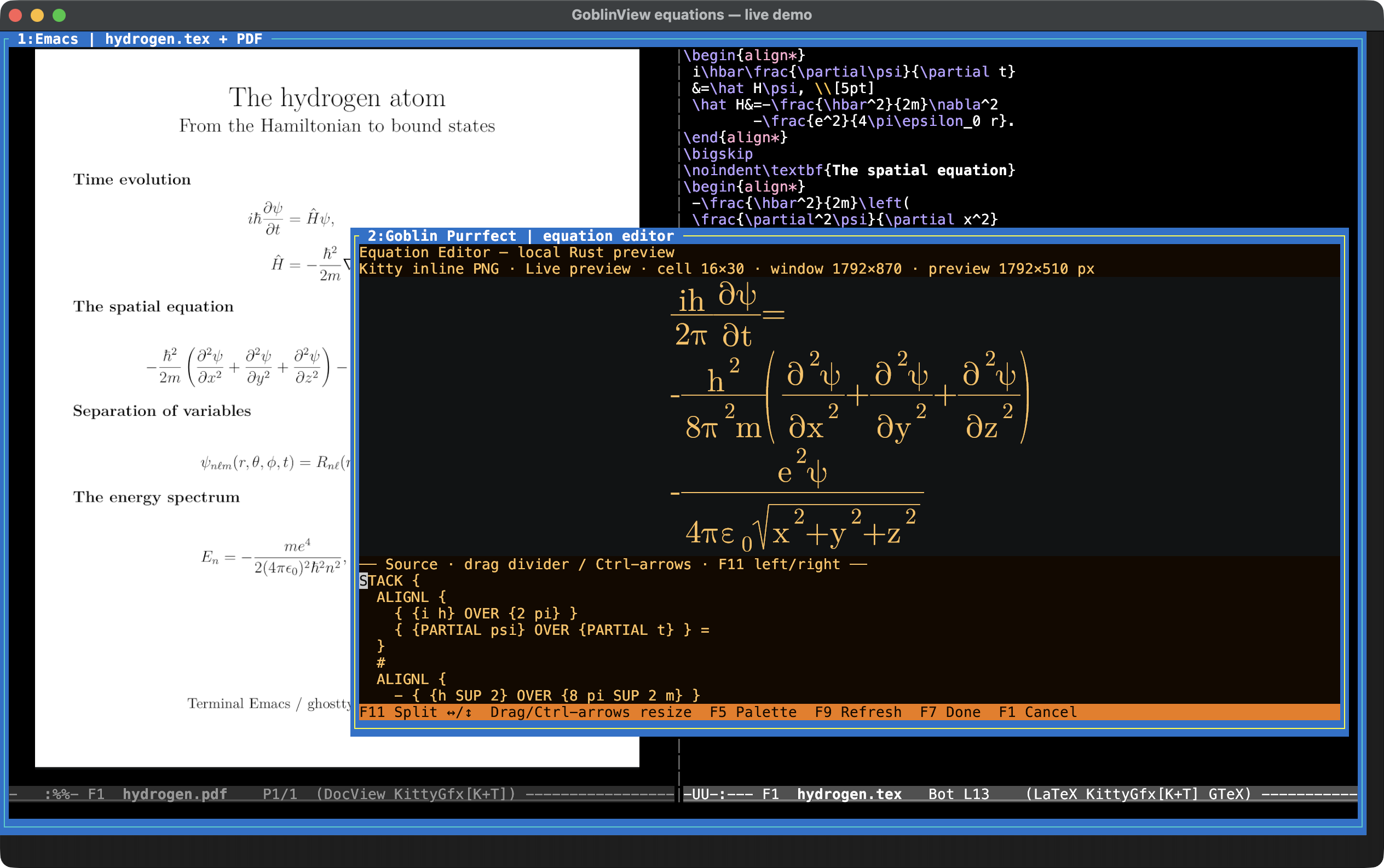
The foreground equation is the time-dependent Schrödinger equation for the hydrogen atom, with the three spatial derivatives and the Coulomb potential written out. Fractions, superscripts, Greek letters, a square root, and stretching parentheses give the equation renderer something substantial to do. Behind it, Emacs has a typeset page about the same Hamiltonian beside its LaTeX source.
Look at the left edge of the Purrfect window. It cuts straight through the background formulas. The visible pieces of the PDF stay where they belong: above the window, down its left side, and in the strip below it. The covered part stays covered, while Purrfect has its own independent equation image.
That is the detail I wanted this screenshot to show. A graphical equation inside a terminal is useful. Being able to put another terminal window over it, with the image correctly fragmented around that window, makes it part of a desktop.
GoblinView: the DESQview part
GoblinView combines overlapping terminal windows with persistent sessions.
I can move and resize a window, raise another one, detach, and come back to
the programs I left running. There are mouse controls and a keyboard menu.
The executable is goblin-view; the implementation is C++23.
Each window has its own terminal state, including its images. GoblinView tracks image data and placements, then composes the visible desktop. Its Kitty output uses Unicode placeholder cells, so an image participates in the same cell-by-cell clipping as the rest of the window. A foreground window can cover part of an image without covering the rest of it.
There are also Sixel input and output paths and conversion between the two graphics protocols. This screenshot exercises the Kitty path: a PDF image from Emacs and a separately rendered equation from Purrfect, sharing one terminal desktop.
Goblin Purrfect: the WordPerfect part
Goblin Purrfect brings back the function keys, the equation language, and
the amber screen I remember from WordPerfect 5.1. The executable is
goblin-purrfect. Underneath that familiar interface is a Unicode-native
editor written in Rust.
The equation preview is drawn inside the editor using real font outlines. Typing updates the preview without launching TeX for each change. The source stays editable terminal text beneath the picture; F11 switches between stacked and side-by-side panes, and the divider can be moved with the mouse or Ctrl plus the arrow keys. F9 still refreshes the preview, and F7 puts the equation into the document.
It also handles images, spell checking, Markdown interchange, and LaTeX/PDF export. PDF output uses LuaLaTeX; PDF print preview also needs Poppler. The interactive equation renderer does not need either.
WordPerfect file compatibility is still incomplete. This is development software, with documented limits on WP 5.1 and experimental WP 6 output. The familiar interface is further along than a promise that every old document will survive every possible edit unchanged.
Try them
The Homebrew repository provides the tap, package inventory, and matching source:
brew tap goblinreactor/tap https://brew.goblinreactor.com/homebrew-tap.git
brew install goblinreactor/tap/goblin-view goblinreactor/tap/goblin-purrfect
goblin-view
Inside a GoblinView shell, run goblin-purrfect edit notes.wp. The
Purrfect setup page
explains the optional PDF tools. Linux setup and package inventories are at
the Debian/Ubuntu repository.
The screenshot uses ghostty-tex in terminal Emacs. The example files are available too: Purrfect equation source, LaTeX source, and the compiled PDF.
DESQview gave me a place for several programs at once. WordPerfect gave me an equation editor I could keep up with. I wanted those things back, with the fonts, Unicode, graphics, and persistent sessions a current machine can provide. This is what that looks like on my desk today.