ghostty-tex / an Emacs package
Keep the PDF
beside your LaTeX.
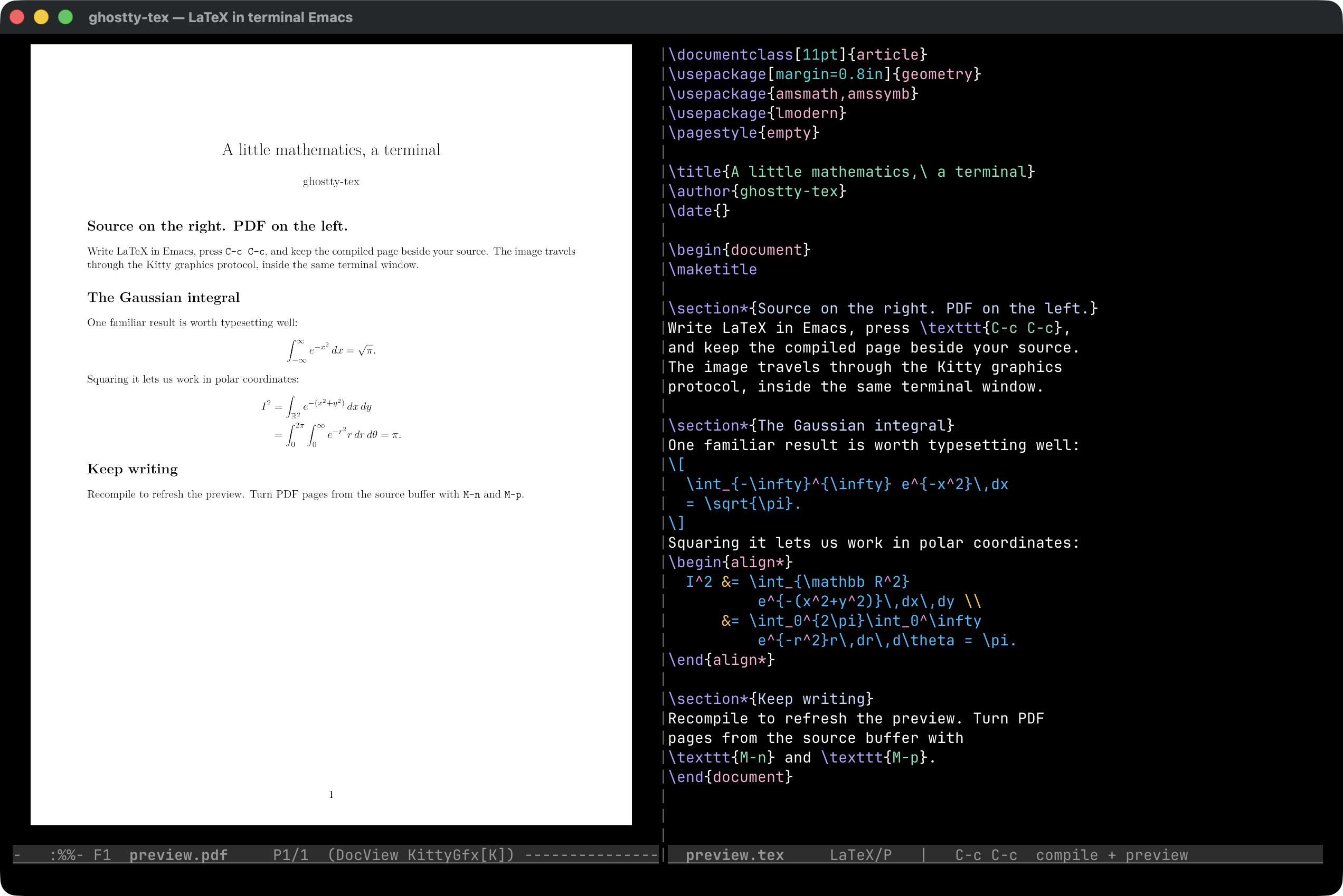
Write in terminal Emacs. Press C-c C-c. The compiled page appears on the left, your source stays on the right, and your hands stay on the keyboard.
Version 0.1.4 Emacs 27.1+ Ghostty + Kitty graphics
01 / The idea
Thirty years was enough.
When I was in college, I had a Toshiba 3100SX running DESQview. I ran WordPerfect 5.1 on it and remember the joy of entering formulas in the equation editor: commands at the bottom, graphical text up top. I loved the responsiveness of seeing the math appear as I worked, every time I pressed F9 to redraw.
When I bought a SPARC 1+ for grad school and learned LaTeX, I was delighted. But I missed something: the tight integration of WordPerfect, even as I loved the mathematical expressiveness of LaTeX.
I settled on putting Emacs on one side and xdvi on the other.
Over the years I replaced xdvi with xpdf, but the
workflow was the same: each document started with the manual alignment
of windows. How much screen real estate I conserved depended on the
precision of my mouse work.
And I’ve always been a terminal person. I rejected Windows; I rejected
X11, preferring to work inside screen. Around this I’ve
gradually built a whole coherent workflow. I have a DESQview clone,
GoblinView,
that basically does what tmux does, with
Kitty graphics
and overlapping windows. I even have a WordPerfect clone called
Goblin Purrfect
that captures the exact equation editing I missed, including the default
amber color of my high school Hercules display and college Toshiba,
but with LaTeX and PDF export.
But today I decided 30 years was enough. For 30 years I waited for a side-by-side Emacs/image viewer, and now I have it.
02 / Use it
One command from source to page.
Open a .tex file in Emacs inside Ghostty. With the package
enabled, C-c C-c saves the buffer, runs LaTeX, and opens or
refreshes the PDF after a successful AUCTeX compilation. It means
Ctrl+C followed by Ctrl+C.
| Key | Action |
|---|---|
| C-c C-c | Save, compile, and display the output. |
| C-u C-c C-c | Open the AUCTeX command prompt for BibTeX, Clean, and other commands. |
| C-c C-v | View the existing output without compiling. |
| M-n / C-c n | Turn to the next PDF page. |
| M-p / C-c p | Turn to the previous PDF page. |
The page keys work while you stay in the source buffer. To keep AUCTeX’s
usual compile binding, set ghostty-tex-take-over-compile to
nil before enabling the mode.
The package also sends copied and killed text to the terminal’s clipboard using OSC 52. Paste from the system clipboard with your terminal’s paste shortcut; this integration only writes to that clipboard.
03 / Underneath
LaTeX typesets. Emacs arranges. The terminal draws.
- AUCTeX runs LaTeX. The output is the document’s ordinary PDF.
- DocView renders the pages. Emacs’s document viewer converts the PDF into PNG images, using
mutoolwhen available. - kitty-graphics sends the pixels. The bundled graphics library transmits the image through the terminal’s Kitty graphics protocol.
- ghostty-tex manages the editing loop. It arranges the panes, refreshes the output, and keeps track of the page you were reading.
Render for the display that is attached now.
A terminal cell has a size in pixels as well as a position in the text
grid. The preview uses fresh cell measurements and the PDF pane’s dimensions
to choose its rendering resolution. The default scale is 2.0,
giving the source image extra pixels for sharp text. Set
kitty-graphics-doc-view-resolution-scale to 1.0
for rendering sized to the display, or nil to disable adaptive DPI.
Version 0.1.4 also handles a less glamorous detail: DocView can be rewriting a page while the graphics code tries to read it. Incomplete PNGs are retried instead of being remembered as successfully transmitted images.
The same arrangement over SSH.
Run Emacs and the conversion tools on the remote machine, with Ghostty on
the machine in front of you. The early-init helper recognizes
TERM=xterm-ghostty before Emacs initializes its terminal.
The remote host also needs Ghostty’s terminfo entry. In tmux, enable
set -g allow-passthrough on; tmux 3.6 or later provides the live
client cell dimensions used by adaptive rendering.
The complete connection must carry Kitty graphics. An SSH setup working directly does not imply that every multiplexer or stock Mosh setup will carry the images too.
04 / Get started
Install into your existing Emacs setup.
You need Emacs 27.1 or newer, Ghostty, a LaTeX installation with
pdflatex, and PDF conversion tools. AUCTeX is recommended
and is the compile-and-preview path shown above.
System dependencies on macOS and Debian / Ubuntu
On macOS, with Homebrew:
brew install emacs ghostscript imagemagick mupdf
brew install --cask ghostty mactex-no-gui
On a Debian or Ubuntu host running Emacs:
sudo apt-get install emacs ghostscript dvipng \
  texlive-latex-base texlive-latex-recommended \
  mupdf-tools imagemagick ncurses-bin
Run Ghostty on the local machine. When using SSH, install its terminfo entry on the host as described in the included README.
1. Install the package.
Download ghostty-tex-0.1.4.tar.
In Emacs, run M-x package-install-file and select the downloaded
file. Install AUCTeX with M-x package-install RET auctex RET
if you do not already have it.
2. Load the early terminal helper.
Add this to ~/.emacs.d/early-init.el. The path below is for
the standard package.el installation directory.
(load (expand-file-name
       "elpa/ghostty-tex-0.1.4/ghostty-tex-early.el"
       user-emacs-directory)
      nil t)
3. Enable the mode.
Add this to your Emacs init file, after your package setup:
(require 'ghostty-tex)
(ghostty-tex-mode 1)
Restart Emacs inside Ghostty, visit a LaTeX file, and press C-c C-c. The README also covers installation by unpacking the drop-in archive.
To disable the integration, use M-x ghostty-tex-mode or
(ghostty-tex-mode -1). To uninstall, remove the configuration
above and use M-x package-delete RET ghostty-tex RET, then restart Emacs.
05 / Release 0.1.4
Download it. Read it. Build it.
The package is Emacs Lisp. Emacs compiles it during installation; the same archive can be used on macOS and Linux.
- Emacs package.tar / install with package-install-file ↗
- Drop-in archive.tar.gz / unpack and add to load-path ↗
- Complete source.tar.gz / Lisp, Makefile, tests, and licenses ↗
SHA-256 checksums README Screenshot’s LaTeX document
From the extracted source, make check builds both package
archives, byte-compiles the Lisp, runs nine rendering tests, and tests
installation in a temporary Emacs package directory. All ten tests passed
for this release on this Mac.
Written by Adam DePrince. ghostty-tex is licensed under GPL-3.0-or-later. It bundles kitty-graphics.el by cashmere under GPL-2.0-or-later, and builds on AUCTeX, Emacs DocView, and Ghostty.